
Stylezen WooCommerce Theme Now Live on WooCommerce.com
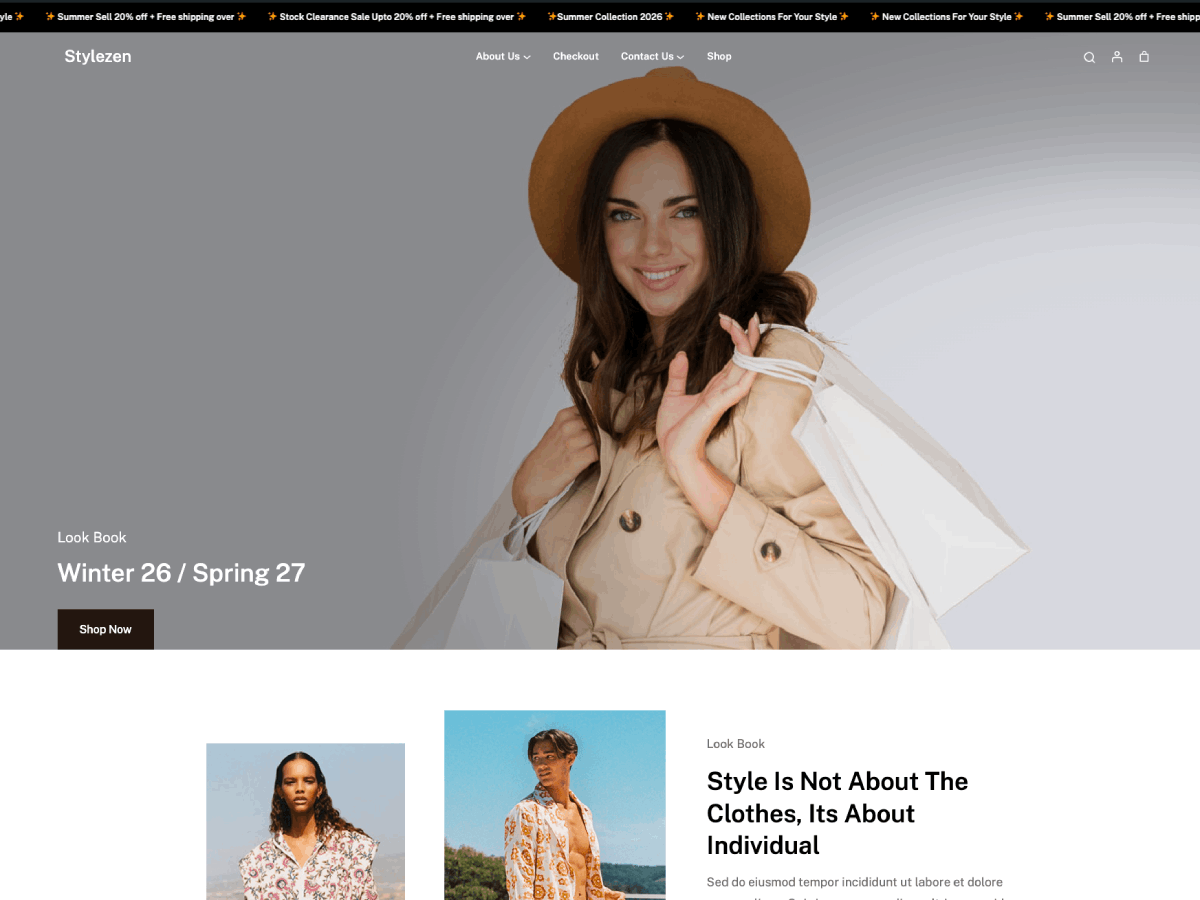
The Stylezen WooCommerce theme is now live on the WooCommerce.com theme marketplace, and we’re excited to share the news. Built for WooCommerce-powered fashion and lifestyle stores, Stylezen pairs full-site editing (FSE) flexibility with a storefront experience made for visual, image-heavy catalogs. It’s also available on Gutenify, where you can explore it on the Stylezen theme page.
Stylezen was built from the ground up for stores that sell on looks as much as on price: fashion, apparel, accessories, and lifestyle brands that need a storefront as polished as their product photography.
That’s why the built-in gallery zoom, lightbox, and slider aren’t an afterthought bolted on with a plugin. When photography is doing most of the selling, shoppers need to see fabric texture, fit, and detail up close before they trust a size chart, and Stylezen’s product pages are built around that expectation from the first template.
Built for WooCommerce, Not Bolted On
Most WordPress themes treat WooCommerce as an afterthought: one generic page layout stretched to cover the shop, the product, the cart, and checkout alike. The Stylezen WooCommerce theme takes the opposite approach. Every core WooCommerce screen gets its own dedicated template, including the shop archive, single product, product category/tag/attribute pages, cart, checkout, order confirmation, and product search results. On top of that, Stylezen ships with:
- Two ready-made homepage layouts to launch with
- A filterable product sidebar for the shop and category pages
- Native product gallery zoom, lightbox, and slider (no extra plugin required)
- A sticky/transparent header with mobile pull-out navigation
- A scrolling announcement marquee for sales, shipping perks, or launches
- A dedicated shop-by-category pattern for merchandising your catalog
- Cover-style banner patterns for archive and single post pages
- Pattern sets for About, Contact, Services, and FAQ pages
Full Site Editing, End to End
Stylezen follows the Full Site Editing standard introduced in WordPress 5.9, so colors, typography, headers, footers, and page layouts are all editable directly in the Block Editor (no custom code, no child theme required). It ships with self-hosted Google Fonts (Lexend and Public Sans) for speed and privacy, and includes RTL language support out of the box.
Under the hood, Stylezen builds on the block-theme foundation established by WordPress’s own Twenty Twenty-Two, extended with WooCommerce-specific templates, patterns, and styling on top. That gives it a well-tested base for editor stability, while the WooCommerce layer is what makes it a storefront theme rather than a general-purpose blog theme.
Marketplace-Ready, Accessibility-Checked
The current release, version 1.0.2, is tested against WooCommerce 8.0 through 11.0 and WordPress up to 7.1, and it’s been through a real accessibility pass, not just a checklist. Recent work includes adding proper <main> landmark structure to the shop, product, category/tag/attribute, and checkout templates (and removing a duplicate landmark from the archive and single post templates), corrected heading hierarchy, better color contrast in the footer and 404 page, underlined breadcrumb links, and labeled icon-only header buttons.
A Quick Look at the Release History
Stylezen first launched as version 1.0.0. Version 1.0.1 followed with declared WooCommerce version compatibility in the theme stylesheet header and a fix for a duplicate “Add to cart” button that could appear when a viewed product also showed up in the Best Selling Products section. Version 1.0.2, the release now listed on the WooCommerce.com marketplace, added the accessibility work above, a dedicated Theme Info page in wp-admin, mobile horizontal scrolling for the Best Selling Products pattern, refined WooCommerce component and navigation styling, and formal compatibility with WordPress 7.1 and WooCommerce 11.0.
Get the Stylezen WooCommerce Theme
The Stylezen WooCommerce theme is available now, on the WooCommerce.com marketplace and on Gutenify, and it works with WooCommerce out of the box. Explore the demo, then grab your copy below. Looking for something different for a non-WooCommerce site? Browse more Gutenify themes.
Questions before you switch to the Stylezen WooCommerce theme? Our support team is here to help. Reach out any time.